
How to Automatically Sort Videos by Popularity
Instead of guessing which videos your customers like best, you can let ReelTok's algorithm automatically rearrange them for you.
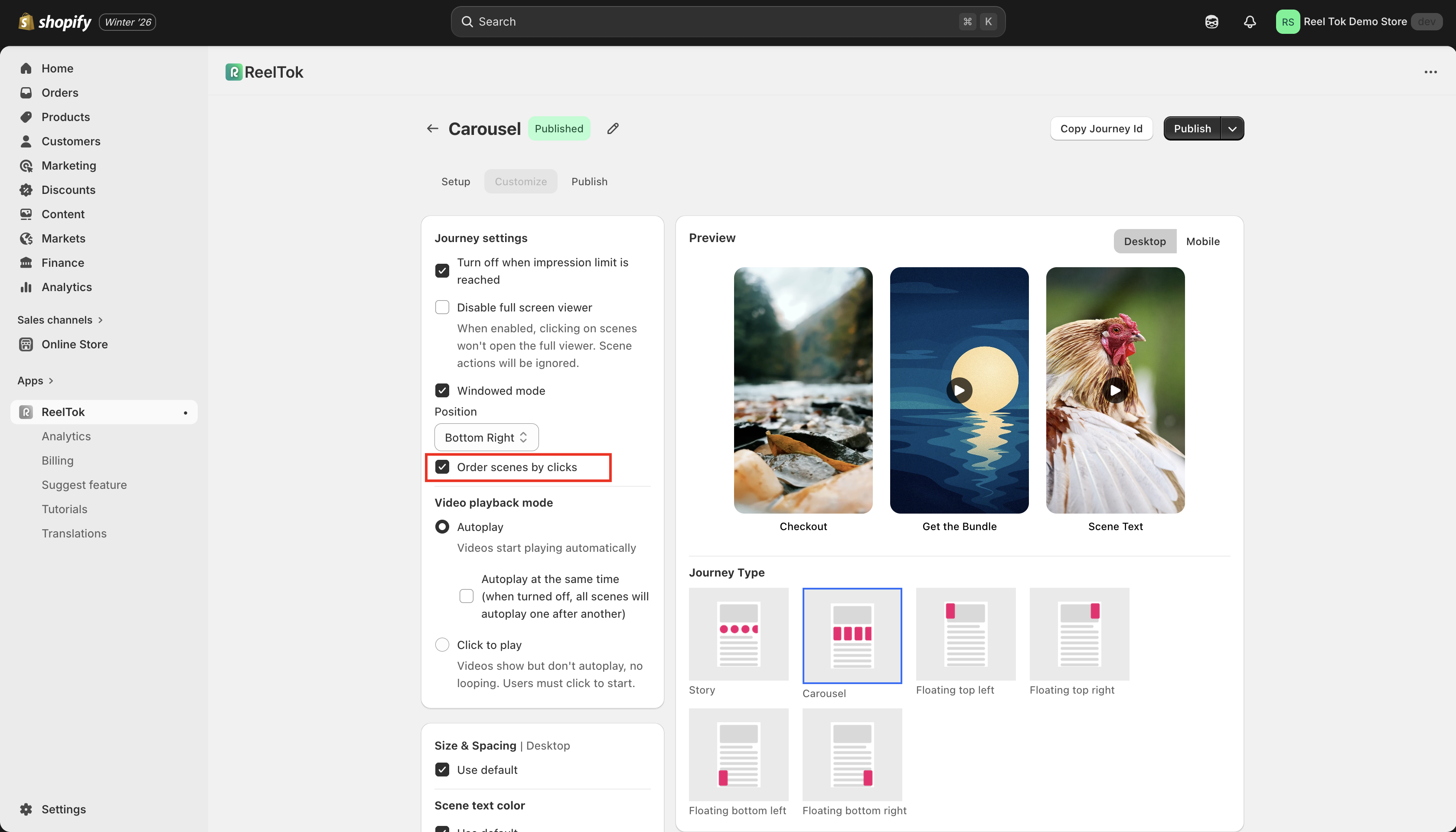
The "Order by Clicks" feature tracks which videos get the most engagement and automatically moves them to the front of the carousel or list. This ensures your best-performing content is always the first thing new visitors see.
How to Turn It On
Open Your Journey:
Go to your ReelTok Dashboard and click on the Journey you want to optimize.
Go to Customize:
Click on the Customize tab (or Settings).
Enable Auto-Order:
Scroll down to the Behavior or Ordering section.
Find the toggle labeled "Order scenes by clicks" (or Auto-Optimize).
Switch it ON.
Save:
Click Save to apply the changes.
How It Works
Initial State: Your videos will appear in the order you uploaded them.
Learning Phase: As customers interact with the widget, the app counts the clicks for each video.
Optimized State: The video with the highest Click-Through Rate (CTR) will automatically jump to position #1, the second-best to #2, and so on.
When to Use This
Large Collections: If you have a carousel with 10+ videos, use this to ensure the best ones aren't hidden at the end.
Testing New Content: Upload 5 new videos and let the "survival of the fittest" algorithm decide which one is the winner.